
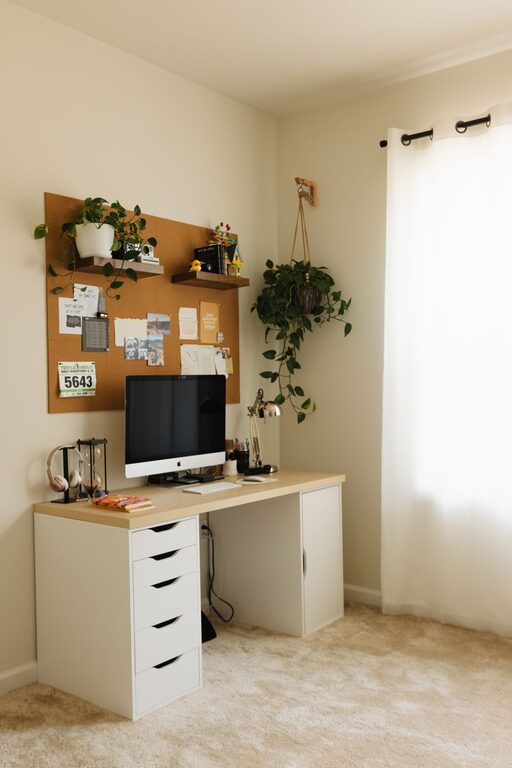
Creating a home office that feels both cozy and productive is essential for anyone working remotely or spending extended time on tasks at home. A well-designed space can boost your focus, reduce stress, and make work more enjoyable. In this post, we’ll explore practical tips to help you set up a home office that supports your best work while keeping you comfortable throughout the day.
Choose the Right Location
Find a Quiet Spot
Pick a place in your home that is quiet and away from distractions like the TV or heavy foot traffic. This could be a spare bedroom, a corner of your living room, or even a nook near a window.
Consider Natural Light
Natural light improves mood and alertness. Set up your desk near a window if possible, but avoid glare on your computer screen. If natural light isn’t an option, choose soft, warm lighting that mimics daylight.
Invest in Comfortable Furniture
Select a Supportive Chair
A good chair is key for comfort and posture. Look for adjustable chairs with lumbar support to keep your back healthy during long work hours.
Choose a Suitable Desk
Your desk should be at a height that lets your arms rest comfortably while typing, with enough surface area for your computer, notes, and supplies. Standing desks or adjustable options can offer flexibility.
Organize for Efficiency
Declutter Your Desk
Keep only essential items within reach to avoid distractions and clutter. Use storage containers or drawer organizers to keep supplies neat and accessible.
Use Shelving and Storage
Adding shelves or filing cabinets near your workspace helps manage paperwork and office tools without crowding your desk.
Personalize Your Space
Add Comfortable Textiles
Incorporate soft cushions, a cozy throw blanket, or a small rug to add warmth and comfort.
Include Plants
Greenery can reduce stress and improve air quality. A small plant or two can brighten your workspace and make it feel inviting.
Display Inspirational Items
Photos, artwork, or motivational quotes can make your office feel personal and keep you inspired throughout the day.
Optimize Your Technology Setup
Invest in Quality Equipment
Reliable hardware like a fast computer, an external monitor, and a good keyboard can enhance your efficiency.
Manage Cables
Keep cords organized with cable clips or sleeves to avoid tangles and maintain a tidy workspace.
Use Headphones
Noise-canceling headphones can help block distractions and improve concentration, especially in noisy environments.
Maintain Good Ergonomics
Position Your Monitor Correctly
Place your monitor at eye level about an arm’s length away to reduce neck and eye strain.
Keep Your Feet Supported
Use a footrest if your feet don’t comfortably reach the floor to maintain good circulation.
Take Breaks and Move
Stand up, stretch, and walk around every hour to avoid stiffness and boost circulation.
Create a Routine and Set Boundaries
Designate Work Hours
Having clear work hours helps separate professional time from personal life.
Set Physical Boundaries
Close the door or use a room divider to signal the start and end of your workday, helping you focus and unwind.
Lighting and Ambience
Use Adjustable Lighting
Desk lamps with adjustable brightness allow you to tailor the light level based on the time of day and your tasks.
Control Room Temperature
Keep the room at a comfortable temperature to avoid distraction caused by being too hot or cold.
Final Thoughts
Designing a cozy and productive home office is about balance. Comfortable furniture, good lighting, and a tidy setup are the foundation of a space where you can focus and feel relaxed. Personal touches and a well-thought-out routine can make your home office a place where work actually feels enjoyable. With these tips, your workspace can support your best efforts every day. Happy decorating!